Stop rebuilding the same spreadsheet
Monitor several competitors at once, on an update schedule you choose. The comparison is ready when you need it, without visiting each competitor's site.
ProductXL compares your prices with your competitors', product by product, so you know where to lower, raise or hold, all automatically.
 Wireless headphones
Your price
€129.00
Cheapest rival
€119.00
Higher
Rival is €10 cheaper
 Eau de parfum, 100 ml
Your price
€75.00
Cheapest rival
€75.00
Same
Matches cheapest rival
 Smartwatch, 44 mm
Your price
€149.00
Cheapest rival
€169.00
Lower
Room to raise price?
 Leather sneakers, size 42
Your price
€89.00
Cheapest rival
€99.00
Lower
Rival out of stock
 Glass electric kettle, 1.7 L
Your price
€49.00
Cheapest rival
€44.00
Higher
2 rivals are cheaper
Sample products and prices. Choose a card to see the full comparison.


























Pick a product to see your price next to each competitor's, and the price that makes you the best offer by a small margin.
Marketplaces count too, not only other online stores: 

Choose a product
Sample dataPrices from cheapest to most expensive
Sample prices, including VAT.
Book a demoMatching every discount costs you margin. Ignoring every discount costs you sales. The right move depends on making decisions fast.
ProductXL shows you the gap. Your rules decide what happens next.
Three steps turn your product feed into a price comparison you can act on.
Import your products from Shopify or any other store platform, or scrape them, then choose the competitors, including marketplaces like Amazon and eMAG, and the market you want to monitor.
 Wireless headphonesGTIN 5901234123457€129
 Eau de parfum, 100 mlGTIN 4006381333931€75
 Smartwatch, 44 mmGTIN 0012345678905€149
Products are matched using identifiers like GTIN or MPN, plus AI-assisted matching. You review the matches and remove the wrong ones.
Your productWireless headphones
See where you're higher, lower or equal, with competitor stock availability. Then choose which products, brands or categories get automatic price updates.
Takes under a minute to request
Monitor several competitors at once, on an update schedule you choose. The comparison is ready when you need it, without visiting each competitor's site.
Filter comparisons by brand, category or price range, and focus on one slice of your catalog at a time.
A cheaper offer that's out of stock isn't competing for today's order. Stock status sits next to every competitor price. In addition, we scrape and match their bestsellers with ours.
Monitor competitors in Romania or abroad. ProductXL works in any country, language and currency, so each market is compared on its own terms.
Automatic price updates follow the rules you set. Tell ProductXL how to compete and where to stop.
Stay 1% below the cheapest competitor, but never below cost of goods plus 25%.
Floor applied. The rule stops at €100.00 instead of following the competitor down.
Example only. Prices exclude VAT. A markup on acquisition cost is not the same as net profit after advertising, delivery and returns.
Price data can go straight into your product feed as a label. In Google Ads, Meta Ads or any other platform, you can then split products with the best price on the market from the rest, and budget for each group differently.
 Google Ads
 Meta Ads
Campaign labels and POAS depend on the ProductXL modules included in your setup.
Sponsored
 Best price
Smartwatch, 44 mm
€168.00
YYour store
Smartwatch, 44 mm
€169.00
AStore A
Cutting a price to become the best offer feels like giving away margin. But on Google Shopping the ad gets cheaper and converts better at the same time. More orders from the same budget can more than pay for the smaller margin on each one.
| Figure | Not the best price2% above the best | Best priceprice cut by 2% |
|---|---|---|
| Selling price | €1,000 | €980 |
| Margin per order | €200 | €180 (−€20) |
| Cost per click | €1.00 | €0.84 |
| Clicks | 1,000 | 1,190 |
| Conversion rate | 2.0% | 2.6% |
| Orders | 20 | 31 (+55%) |
| Ad cost per order | €50.00 | €32.26 |
| Margin from orders | €4,000 | €5,580 |
| Ad spend | −€1,000 | −€1,000 |
| Profit after ads | €3,000 | €4,580 (+53%) |
You earn €20 less per order but make €1,580 more profit, because the same budget brings 11 more orders. Example product with a 20% margin, a €1.00 cost per click and a 2.0% conversion rate. The best-price column assumes a 16% lower cost per click and a 30% higher conversion rate. Your own results will differ.
The trick is to cut only as far as needed to become the best price. That's why the sample comparison above shows the price that makes you the best offer, by a small margin.
Most stores check competitor prices by hand in a spreadsheet, or use a tool that only tracks prices. Here's what each option gives you.
| Capability |  |
Generic price tracker | Spreadsheet |
|---|---|---|---|
| Competitor prices collected automatically | Yes | Yes | No, checked by hand |
| Competitor stock next to price | Yes | Yes | Only if you check |
| Automatic price updates with price floors | Yes | Varies by tool | No |
| Price position used in Google Shopping campaigns | Yes, as a feed label | Varies by tool | No |
| Feed management and POAS on the same product data | Available in the platform | Separate tools | No |
| Best fit when | You want pricing and advertising decisions made from the same product data | You only need price data | You check a handful of products now and then |
“Moving to POAS gave us a much clearer picture of profitability. We can better understand which products generate profit, make smarter pricing decisions, and identify unnecessary costs that would otherwise go unnoticed.”
“In a challenging market, understanding your products and making informed decisions becomes essential. Better visibility into performance and costs helps us identify opportunities while being more careful with our advertising investment.”
“ProductXL helped us identify our most in-demand and profitable products while simplifying catalog management. Instead of getting lost in product data, we can focus on the products and decisions that matter most to our business.”
“One of the most useful things about ProductXL is how it connects product-level information with advertising performance. It’s much easier to identify opportunities when you can see the data that matters in one place.”
“The biggest advantage is being able to see which products deserve more advertising investment. Instead of focusing only on sales, we can make smarter decisions based on product performance and profitability.”
“Analyzing performance across thousands of products used to require hours of manual work. ProductXL helps us quickly identify top performers, spot products wasting budget, and make more informed advertising decisions.”
“ProductXL eliminated much of the manual work involved in analyzing our product catalog. We can identify high-performing products faster, make better use of our advertising budget, and rely on responsive support whenever we need it.”
“ProductXL makes product feed segmentation incredibly flexible. We use it across multiple online stores, adapting our strategies to each client’s catalog and advertising needs without rebuilding everything from scratch.”
“Managing Google and Meta Shopping catalogs is significantly easier with ProductXL. The intuitive interface, smart search features, and platform integrations help us spend less time on repetitive setup and more time optimizing campaigns.”
“ProductXL has changed how we manage product feeds and optimize PPC campaigns. From AI-generated product content to smarter feed management, it gives us practical tools to improve efficiency and keep advertising costs under control.”
“What impressed us most about ProductXL is its flexibility. We can customize the platform around our catalog and business requirements instead of having to adapt our processes to the limitations of a tool.”
“Having the right tools makes a real difference when managing eCommerce growth. Better access to product data and a more structured optimization process help us make decisions with greater confidence.”
“Growing revenue is important, but understanding what that growth costs is just as important. Looking at product performance through profitability helps us prioritize the right opportunities instead of relying only on ROAS.”
“ProductXL brings structure to the way we manage and analyze our products. Having better visibility into performance helps us make more consistent decisions and focus on sustainable, profitable growth.”
“What I appreciate most is that ProductXL goes beyond showing numbers in a dashboard. It helps us understand product performance and identify opportunities to improve our advertising efficiency.”
“ProductXL makes managing product data much easier. The platform brings important information together, simplifies repetitive tasks, and gives us more time to focus on growing the business.”
“Managing a product catalog involves a lot of small decisions. ProductXL makes the process easier by giving us better control over product information, segmentation, and optimization across advertising channels.”
“A very practical solution for managing product feeds. Being able to organize, segment, and optimize product data in one place makes everyday work much more efficient.”
“ProductXL simplifies complex product management tasks and makes it easier to work with large catalogs. A useful platform for businesses that want more control over their product data.”
Join the stores and agencies above
Can't find your answer? Ask us during the demo.
No. Automatic updates only apply to the products, brands or categories you choose, and they follow your rules and price floors. You can also just monitor and change prices yourself.
Products are matched using identifiers such as GTIN, MPN or with our AI assistant for products without them. You can review the matches and unmatch anything that isn't a true equivalent, such as a different size or bundle.
You decide the update frequency for your project. We'll agree on it for your catalog and competitors before monitoring starts.
Price monitoring is priced on demand. The cost depends on how many products and competitors you want to monitor. We'll define that with you and send a quote for your setup.
You see competitor stock status next to the price, so you can tell whether a cheaper offer can actually be bought before you react to it.
Yes. You can review comparisons by brand, category or price range, and use different pricing rules and exclusions for each group.
Yes, the tool allows you to monitor prices across a wide range of competitors simultaneously.
ProductXL imports product data directly from Shopify and other store platforms, or by scraping, and works in any country, language and currency. Ask us during the demo what your setup needs.
Leave your details and we'll contact you to schedule a demo.
Prefer to talk now? Call our Bucharest team at +40 767 46 1111
We'll contact you to schedule the demo.
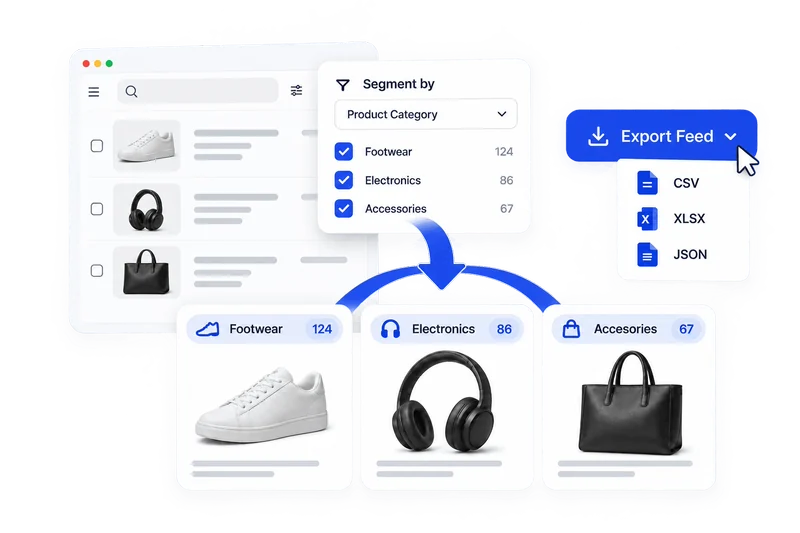
Sort every product in your feed by its sales, ROAS and clicks, and label it for your campaigns.
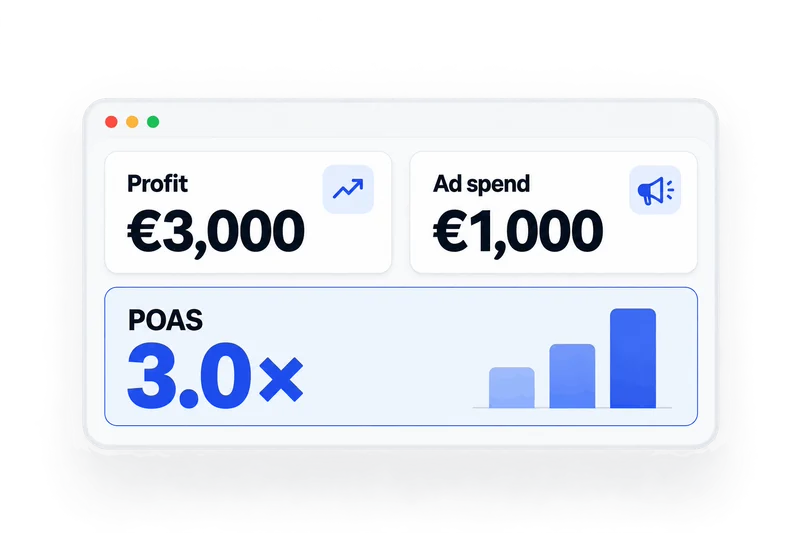
Bid on the profit each product makes, not only on its revenue.
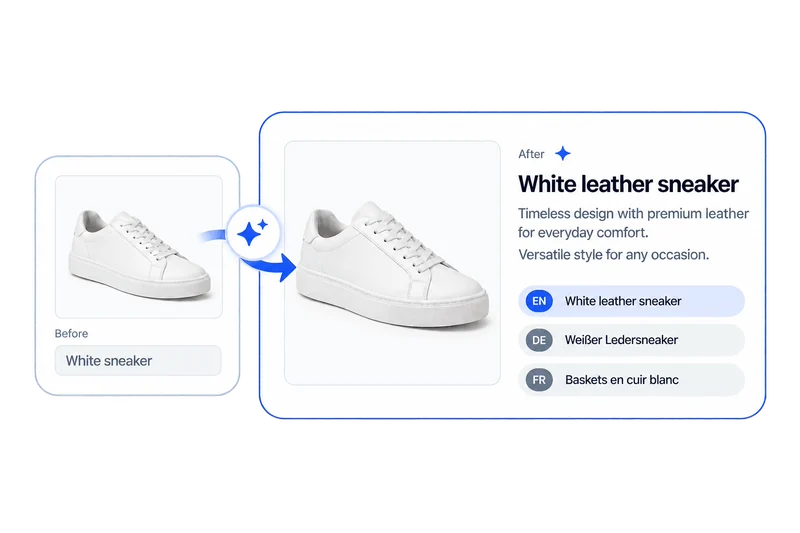
Write titles, descriptions, key features, highlights, Q&A and more, in any language.
Cookies on ProductXL
We use cookies to keep the site working, see how it’s used and make our ads more relevant. Essential cookies are always on; the others only with your consent. Cookie policy
Details and terms
Operator: Tidy Corp SRL, the company behind ProductXL. Contact: [email protected].
Essential cookies keep the site working and remember your cookie choice. They are always on.
Analytics cookies, such as Google Analytics, tell us which pages you visit and how long you stay, so we can improve the site.
Marketing cookies help us measure our ads and show you more relevant ones on other sites.
The booking calendar on the Contact page is provided by HubSpot, which may set its own cookies.
You can change or withdraw your choice at any time from the "Cookies" button at the bottom of the page. More in our privacy policy:https://productxl.com/privacy/